
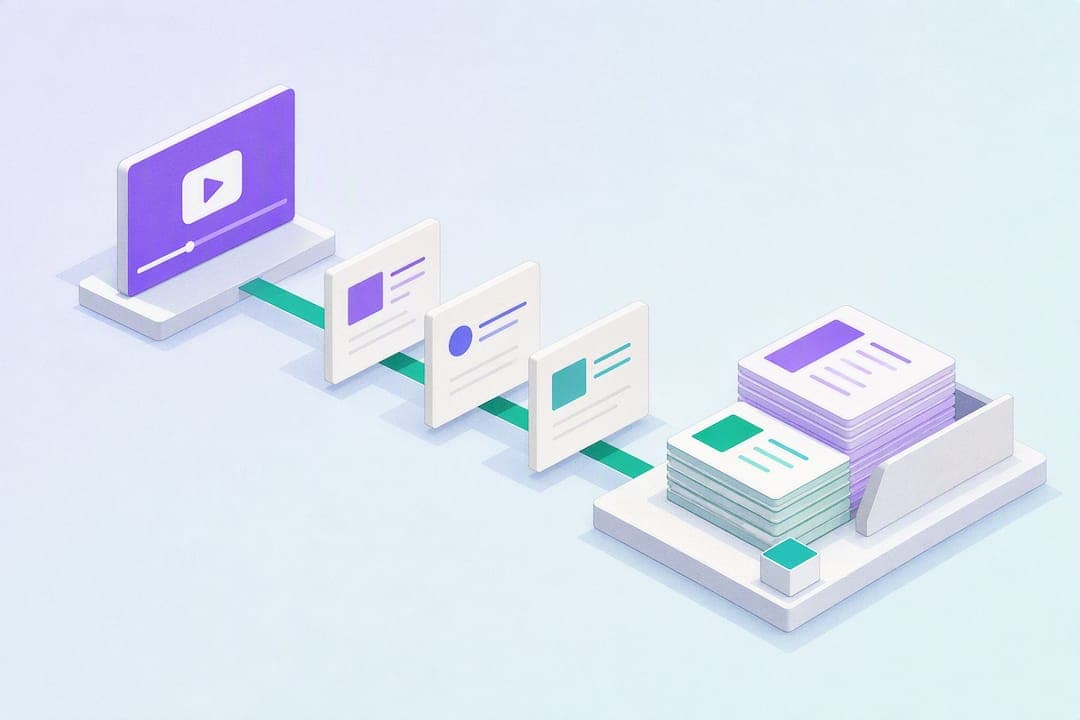
Paste a YouTube link into an AI note-taking tool, and within a minute or two you get a transcript broken into timestamped sections, a short summary, and often flashcards ready for review. The tool handles the transcription and structuring; you handle the editing and studying. Start now by copying a public YouTube URL and pasting it into a converter like AtListen.
TL;DR:
- Converting lengthy videos to notes can take several minutes, especially for dense or multi-speaker recordings, but shorter videos process within seconds.
- Exact timestamp accuracy is generally within a few seconds, making it reliable for navigation, but verbatim quotes should still be verified against the original audio.
- Server-based tools process audio remotely, offering richer features like multi-language output and flashcard generation, but may pose privacy concerns for private videos.
- Deep review modes allow generating both detailed and quick skim summaries from the same video, enabling flexible study preparation without reprocessing.
- A structured, segmented note set with summaries and flashcards optimizes active recall, turning hours of lecture footage into manageable review chunks.
Table of Contents
- How Youtube To Notes Conversion Actually Works
- What Are the Steps to Convert a YouTube Video?
- What Features Should You Expect From a Good Tool?
- How Do You Build a Study Routine Around AI Notes?
- When Should You Double-Check Automated Notes?
- Why Structured Notes Change How You Actually Study
- Get Study-Ready Notes From Any Video in Minutes
- Helpful Links for Going Further
- Sources
- FAQ
How Youtube To Notes Conversion Actually Works
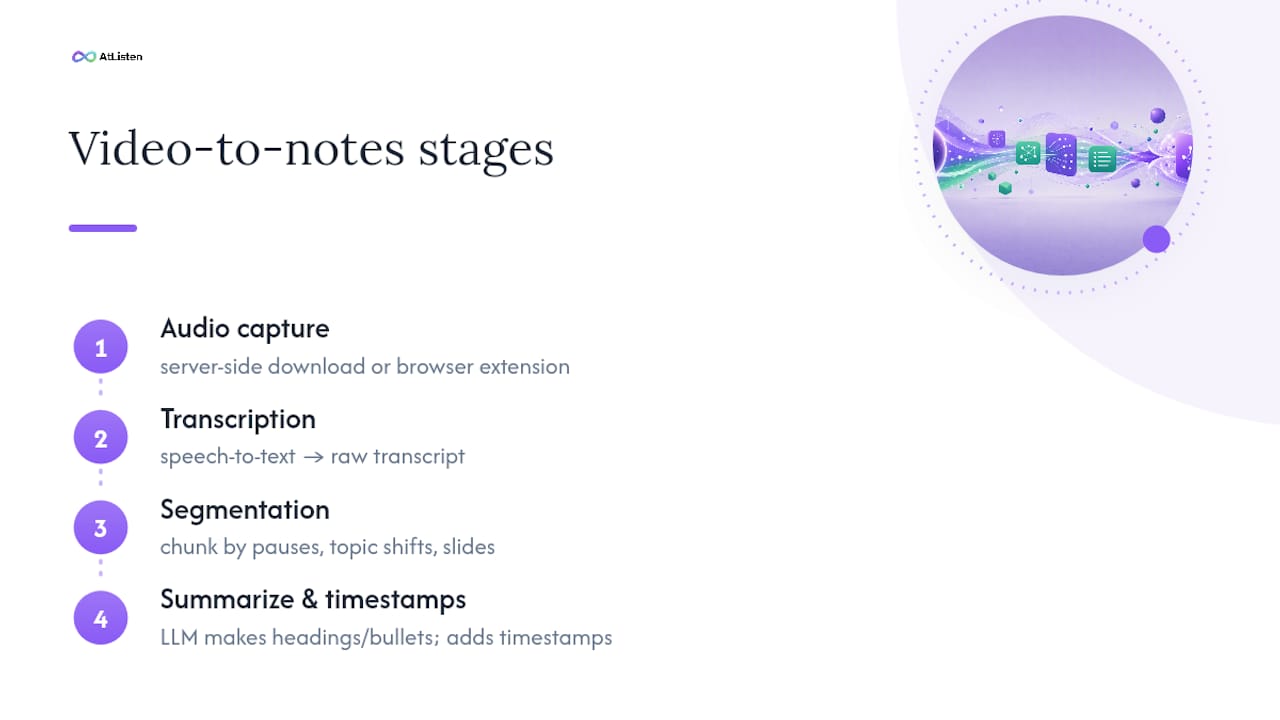
Converting a video into notes runs through four stages, and understanding them helps you predict where quality will slip. First, the tool pulls the audio track, either through server-side extraction (the video URL gets sent to a backend that downloads and processes it) or through a browser extension that captures audio directly from the page you're watching. Server-side tools tend to handle longer videos more reliably; extensions are faster for quick, single-video capture.
Next comes speech-to-text transcription, followed by segmentation, where the raw transcript gets chunked into logical blocks based on pauses, topic shifts, or slide changes. An LLM then summarizes each chunk into headings, bullet points, and key takeaways. Timestamps get attached to every heading and major line during segmentation, so clicking a note jumps you straight to that moment in the video, a feature browser extensions have offered locally for years.
Processing time scales with video length. A 15-minute tutorial usually finishes in under a minute; a two-hour lecture can take several minutes, especially with dense speech or multiple speakers.
What Are the Steps to Convert a YouTube Video?
You don't need a technical background for this. Here's the sequence that works across most tools, including AtListen:
- Get the link. Copy a public or unlisted YouTube URL. Private videos won't work through server-based tools since the backend can't authenticate your personal YouTube session — you'll need to download the video and upload the file directly instead.
- Paste or click. Drop the URL into the web app's input field, or if you're using a browser extension, click its toolbar icon while the video is open. Extensions capture in real time; web apps fetch and process after submission.
- Choose your depth. Pick a quick summary for review or a full note set with flashcards for deep study, and select your output language if the tool offers translation.
- Review and adjust. Skim the generated notes, fix any misheard terms, and highlight the sections you'll actually be tested on.
- Export and study. Send the notes to Markdown, Anki, Notion, or PDF, then start your review session.
What Features Should You Expect From a Good Tool?
Not every converter produces the same quality of output. Here's what separates a genuinely useful study tool from a bare-bones transcript dump:
- Clickable timestamps. Every heading links back to the exact video moment, so you can verify a claim in seconds instead of scrubbing through 40 minutes of footage.
- Top-of-note summary. A three-to-five bullet takeaway block lets you decide in ten seconds whether you need the full notes or just a refresher.
- Structured outlines with speaker labels. Useful for lectures with guest speakers or panel discussions where attribution matters for citations.
- Flashcards and quizzes. Tools that convert summaries directly into flashcard decks save you the manual step of writing your own Q&A pairs.
- Export flexibility. Markdown for personal notes, Anki CSV for spaced repetition, Notion for team projects, PDF for printing.
- Depth control. A skim mode for quick review before class, and a deep mode that captures every sub-point for exam prep.
Pro Tip: Run dense lecture videos through deep mode first, then generate a skim-mode summary from the same notes for exam-week review. You'll have both versions without reprocessing the video.
How Do You Build a Study Routine Around AI Notes?
Notes sitting in a folder don't teach you anything. The value shows up once you build a repeatable routine around them, something researchers on active recall have pointed to for decades, and something tools built for study workflows now support directly.
- Convert key sections into flashcards immediately after generation, while the material is still fresh, and schedule your first review within 24 hours.
- Use the short summary for last-minute review the morning of an exam; save the full notes for your first real study pass, days or weeks earlier.
- Run a 10-minute flashcard drill daily on cards tagged from that week's lectures, then reserve one 30-minute block weekly for a deep read with active recall prompts, covering the notes and testing yourself before checking.
- Export a shared Markdown or Notion version when you're prepping with a study group, so everyone works from the same timestamped source instead of five different sets of handwritten notes. A related approach using annotated highlights for project-based learning works well for visual subjects like biology diagrams or engineering walkthroughs.
When Should You Double-Check Automated Notes?
Transcription accuracy drops with background noise, overlapping speakers, and heavy accents, three conditions common in recorded classroom lectures and casual tutorial videos alike. Clear, single-speaker audio produces the most reliable transcripts, while multi-guest panels or noisy recordings introduce more misheard terms and dropped words.
Timestamp precision is usually accurate within a few seconds. That's fine for jumping back to a topic, but you should always verify a specific number, date, or quote against the original audio before citing it in an assignment.
There's also a real privacy tradeoff worth knowing about:
- Local-storage browser extensions keep your notes on your own device with no server upload required, which appeals if you're wary of cloud storage.
- Server-side tools process audio remotely, which enables richer features like multi-language output and automatic flashcards, at the cost of your audio briefly touching a third-party server.
- Age-restricted or private videos often fail outright with server-based converters and need manual download and upload instead.
Treat any AI-generated note as a strong first draft, not a final source. Cross-check anything you plan to quote directly.
Why Structured Notes Change How You Actually Study
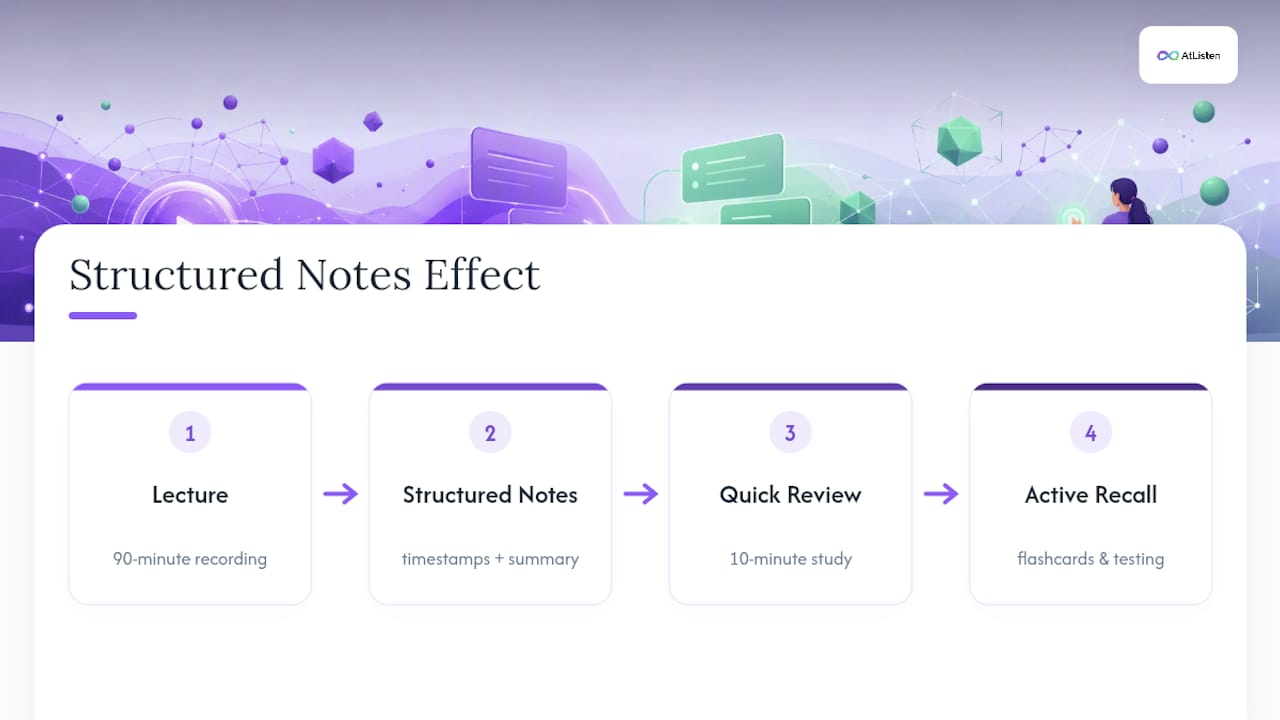
The biggest shift I've noticed in how students use AI transcription tools isn't speed, it's structure. A raw transcript is just words. A timestamped, segmented note set with a summary up top turns a 90-minute lecture into something you can review in ten minutes before moving into active recall. That's the difference between rereading and actually testing yourself.
Tools that also generate flashcards and let you control depth, skim versus deep, close the loop between watching and retaining. That combination is exactly what AtListen was built around.
— William
Get Study-Ready Notes From Any Video in Minutes
AtListen turns lectures, tutorials, and any YouTube video you paste in into structured notes, key concepts with definitions, practice questions, and spaced-repetition flashcards, all with depth control so you choose between a quick skim or a full deep-study package. Where most converters stop at a transcript and a summary, AtListen builds the entire study package (notes, flashcards, and practice questions) from one input in minutes.
You can try it free before committing to anything. The Free plan lets you test the workflow, the Pro plan runs $19.99 a month, and Max runs $39.99 a month for heavier course loads and unlimited depth settings. If you're wondering how your video data gets handled, AtListen's security practices and its children's privacy policy cover the details. Paste your next lecture link into AtListen and see your first note set generate in real time.
Helpful Links for Going Further
- AtListen Security — data handling and processing practices.
- YouTube Notes extension — example of local-storage, timestamp-based note capture.
- YouTube Timestamp Notes — extension with keyboard shortcuts and export options.
Sources
- YouTube Notes (Firefox add-on) — Mozilla Add-ons
- YouTube to Notes — Free AI Video Summarizer & Note Maker | AudioToNotes
- Turn YouTube Videos into Study Notes | DistillNote
FAQ
Can You Convert a Private YouTube Video Into Notes?
Not directly through most web-based tools, since the server can't access a private session tied to your account. You'll typically need to download the video and upload the file manually to get it processed.
How Accurate Are AI-Generated Timestamps?
Timestamps are usually accurate within a few seconds of the actual moment in the video, which is precise enough for click-to-seek review. Accuracy drops slightly with overlapping speakers or poor audio quality, so verify anything you plan to quote directly.
What Export Formats Can You Use for Study Notes?
Most tools support Markdown, PDF, and Notion exports, with some offering Anki-ready CSV files for flashcard decks. AtListen lets you export structured notes and flashcards directly into your study workflow from any Free, Pro, or Max plan.
Does Converting a Video to Notes Cost Anything?
AtListen offers a Free plan at no cost for basic conversions, with Pro at $19.99 a month and Max at $39.99 a month for higher usage limits and deeper study packages. Pricing details and plan comparisons are listed on the AtListen site.
Do These Tools Work on Videos Without Captions?
Yes. Since the transcription happens through speech-to-text audio processing rather than pulling existing captions, a video with no captions at all can still generate a full note set. Audio clarity matters more than caption availability for final accuracy.