

Create a study schedule by listing every subject and deadline you have, blocking out your real weekly availability, and ranking tasks by urgency and difficulty. Time-block your hardest subjects into your peak-energy hours, add breaks and recovery time, and let an AI planner auto-distribute the hours and adjust the plan when life gets in the way. That combination gets you a usable weekly schedule in under 30 minutes.
TL;DR:
- Prioritize studying your hardest subjects during your peak-energy hours and build buffer time for unexpected delays or overflow.
- Use detailed semester deadlines and fixed commitments to create a realistic weekly plan, adjusting review density as exams approach.
- Match study blocks to task type, with short intervals for drills and longer sessions for deep work, while incorporating spaced review for better retention.
- Employ AI study planners that auto-distribute study time, adapt when sessions are missed, and support content uploads to generate personalized study packages.
- Set conservative weekly study targets, especially if balancing work and study, and protect at least one rest day to prevent burnout.
Table of Contents
- How Do You Build a Study Schedule Step by Step?
- How Do You Turn Semester Deadlines Into a Weekly Plan?
- What Scheduling Techniques Actually Improve Focus?
- Can AI Actually Build Your Study Schedule for You?
- What Do Sample Study Schedules Actually Look Like?
- How Do You Stick to a Study Schedule Without Burning Out?
- A Realistic Take on Study Planning
- Build Your Schedule and Study Plan With AtListen
- Sources
- FAQ
How Do You Build a Study Schedule Step by Step?
A study schedule only works if it starts with real numbers, not guesses. Before you touch a calendar app, gather what you actually need to plan around.
- List your inputs. Write down every course, exam date, and assignment deadline for the term, plus the hours you're genuinely free each week (not the hours you wish you had).
- Estimate study time honestly. A reading-heavy humanities course and a problem-set-heavy statistics course don't need equal time. Guess conservatively, then adjust after week one.
- Set a weekly hour cap. If you're working full time or juggling a job alongside classes, cap total study hours below what feels comfortable, not above it.
- Prioritize by urgency and difficulty. Rank tasks so the hardest, most time-sensitive material gets fixed slots first.
- Time-block the week. Assign specific days and hours to specific subjects rather than writing a vague "study" block.
- Leave buffer time. Build in unscheduled slots for overflow, because something always runs long.
Once the inputs are in, split your week into two categories:
- Fixed slots: class time, work shifts, recurring commitments, and your hardest-subject study blocks.
- Flexible slots: lower-priority review, catch-up reading, or open buffer time you can move without wrecking the whole week.
Put the plan somewhere you'll actually see it, whether that's a wall calendar, a planner app, or a shared digital calendar, and check it for 30 seconds each morning. That daily glance is what separates a schedule you follow from one you wrote and forgot.
How Do You Turn Semester Deadlines Into a Weekly Plan?
Start with the whole semester before you zoom into any single week. Build a master calendar listing every exam date, paper deadline, and project due date the moment your syllabi land, following the same logic Cornell's Learning Strategies Center recommends for combining long-term planning with weekly routines.
From there, work backward:
- Mark fixed weekly commitments first (classes, work, recurring obligations).
- Reserve your peak study windows around those fixed blocks, before anything else claims them.
- As exams approach, anchor urgent-subject sessions into the two-week and one-week windows immediately before the test. This is when review density should spike.
- Export the whole thing to Google Calendar, Apple Calendar, or Outlook using an .ics file, since most planning tools support that format and it turns your plan into reminders you can't ignore.
- Once you have a week that works, save it as a template you copy forward. Adjust for exam weeks, but don't rebuild the whole structure every seven days.
A week-number reference tool can help if your syllabus lists deadlines by academic week rather than calendar date, which is common in semester-long courses with rolling assignments.
What Scheduling Techniques Actually Improve Focus?
Not every study block should be the same length. Match the block to the task.
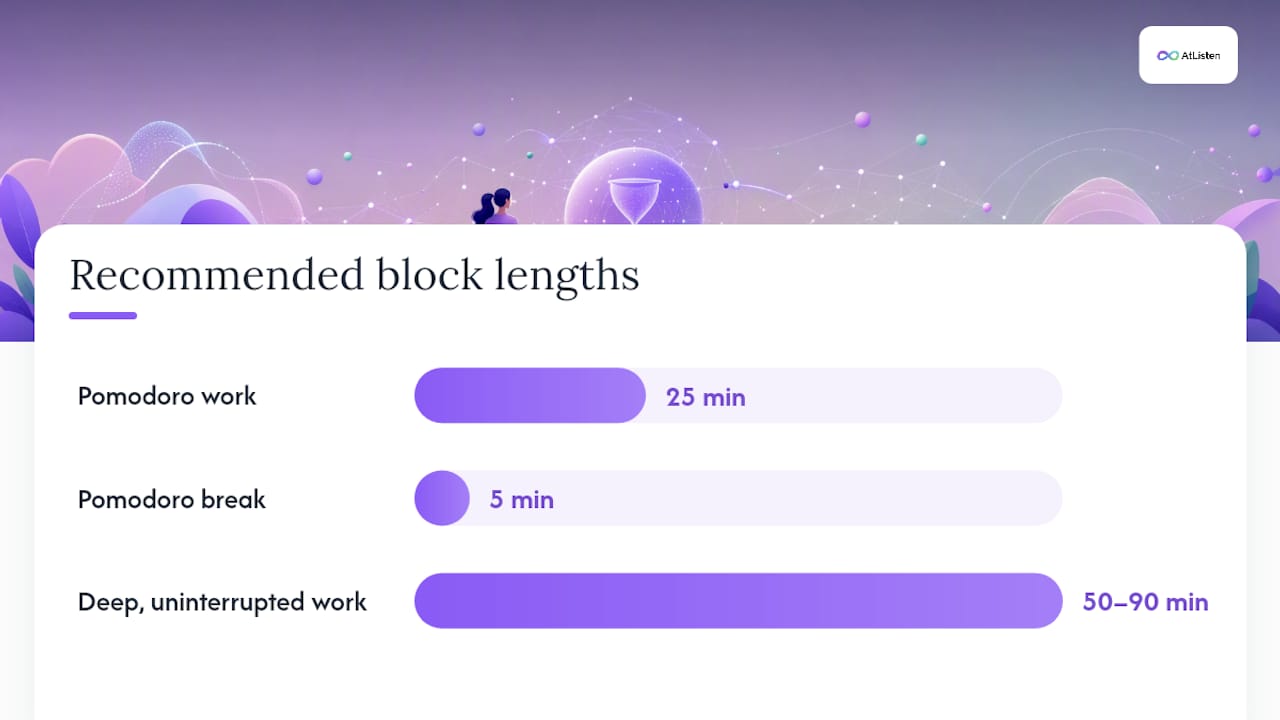
- Short, high-frequency tasks (vocabulary drills, flashcard review, problem sets you already understand) fit a 25-minute Pomodoro cycle with a 5-minute break.
- Deep, concentrated work (writing, complex problem-solving, first-pass reading of dense material) needs 50 to 90 minutes of uninterrupted time. Pomodoro's constant interruptions actually hurt this kind of work.
- Spaced review beats cramming for retention. Revisit material at roughly 1-day, 3-day, and 7-day intervals after you first learn it, rather than rereading everything the night before an exam.
- Energy-aware placement matters more than most students think. Slot your hardest subject into whatever two-hour window you're naturally sharpest, and push easier review into your afternoon slump.
Planner tools that let you set a personal energy profile, morning person, balanced, or night owl, will auto-slot difficult subjects into your peak windows and space review across those same 1-, 3-, and 7-day intervals automatically.
Pro Tip: If your weekly study total creeps past what feels sustainable for more than two weeks running, that's not dedication, it's a warning sign. Cut low-yield tasks before you cut sleep.
Can AI Actually Build Your Study Schedule for You?
Yes, and the mechanics are simpler than most students expect. AI study-plan generators take a short list of inputs, subjects, difficulty level, exam dates, and your weekly available hours, and auto-distribute study blocks across the calendar, inserting spaced review sessions without you manually calculating intervals. TrackMates' study plan generator works this way, building a personalized timetable and rebuilding it when your availability shifts.
What separates a decent AI planner from a mediocre one is what happens after you miss a session. A good tool has rebuild logic: it redistributes missed work across your remaining days rather than just piling it onto tomorrow, and it flags overload before your weekly hours spiral.
Typical inputs an AI planner asks for:
- Your subject or course list
- Difficulty or priority weighting per subject
- Target exam or deadline dates
- Weekly available hours
- Preferred study block length
AtListen approaches this from a slightly different angle. Instead of starting from a blank calendar, it starts from your actual course material, lectures, textbook chapters, recorded classes, PDFs, and converts that content into structured study packages in minutes: summaries, key concepts, flashcards built for spaced repetition, and practice questions. From there it generates a personalized study plan that reflects what you actually need to review, not just a generic time grid. Most planning tools, AtListen included, support export or sync so your plan lands directly in the calendar app you already check every day.
What Do Sample Study Schedules Actually Look Like?
Templates work better than blank calendars because they show you what "balanced" looks like in practice, not just in theory.
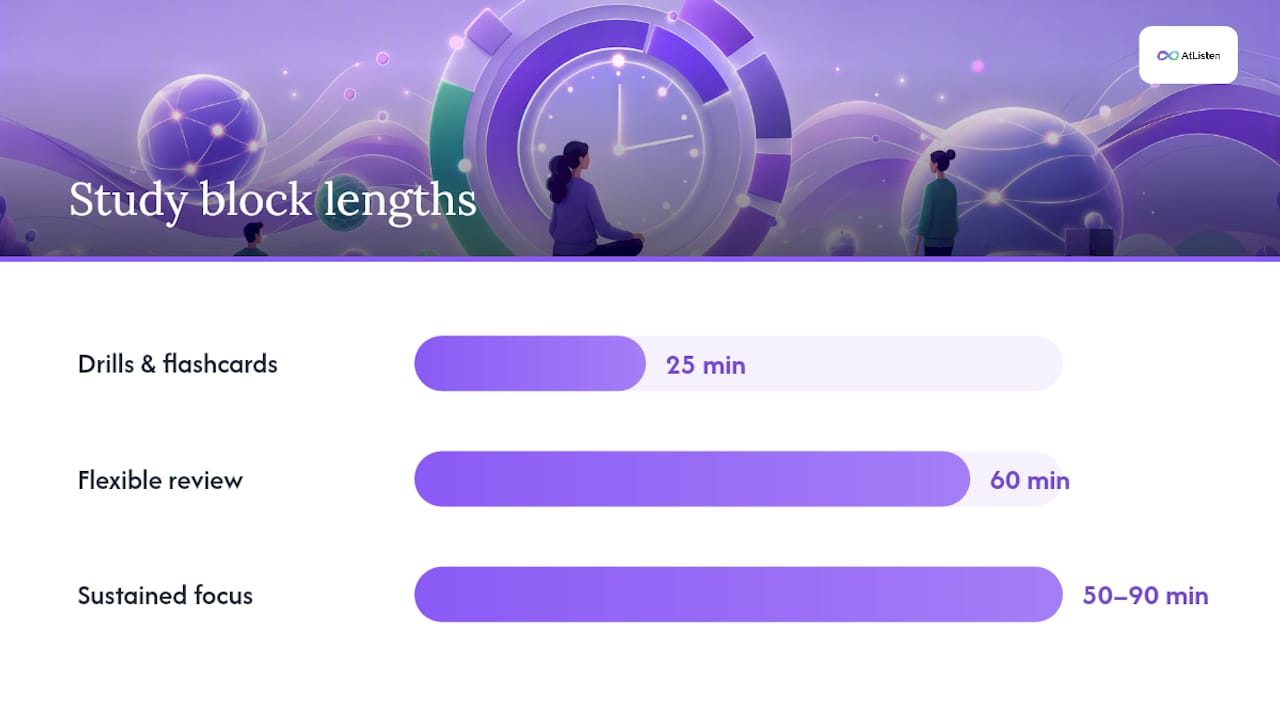
Weekly template: fixed commitments (class, work, sleep) blocked first, two 90-minute peak study sessions for your hardest subjects, one flexible 60-minute block for lower-priority review, and at least one full evening left open for recovery.
Exam ramp (4 weeks out): front-load new material in weeks one and two, shift toward pure review and practice tests in weeks three and four. An intensive version compresses that same curve for a shorter runway.
- Week 1 to 2: learn and consolidate new content.
- Week 3: shift to active recall and practice problems.
- Week 4: full review, spaced at 1-, 3-, and 7-day intervals, plus rest the day before the exam.
One-week crash plan: rank topics by how much they're actually worth on the exam, not how comfortable they feel. Drop anything low-yield entirely and spend the freed time on active practice questions instead of rereading notes.
Pick block length by task type: 25 minutes for drills and flashcards, 50 to 90 minutes for anything requiring sustained focus.
How Do You Stick to a Study Schedule Without Burning Out?
Every schedule breaks eventually. What matters is how you rebuild it.
Run a 10-second daily check: write one sentence noting what you studied and whether it went as planned. That tiny log catches drift before it becomes a lost week.
- When you miss a session, redistribute it across your remaining days rather than stacking it onto tomorrow, and keep a hard cap on weekly hours so the makeup work doesn't spiral into overload.
- Use light accountability: a study partner, a small reward after a tough session, or stacking study time onto an existing habit like your morning coffee.
- Watch for real warning signs, not just tiredness: persistent sleep loss, grades slipping despite more hours studied, or fatigue that doesn't lift after a weekend. Any of those means scale back, not push harder.
Pro Tip: If you're studying while working full time, protect one non-negotiable rest day per week before you schedule anything else. Everything else adjusts around it, not the other way around.
A Realistic Take on Study Planning
Most students overestimate how much free time they actually have. You block out three hours after work and lose 40 minutes to dinner, traffic, or just needing to decompress, and the schedule collapses by Wednesday. The fix isn't more discipline. It's setting conservative targets from the start and letting your weekly hours grow only after you've proven you can hit the smaller number consistently.
AtListen was built around that same realism: turning lectures, videos, and textbooks into structured study material so the planning itself takes minutes, not hours, leaving more of your actual time for studying instead of organizing.
— William
Build Your Schedule and Study Plan With AtListen
If you've spent more time formatting a planner than actually studying, that's the problem. You can upload a lecture recording, a textbook chapter, or a PDF of your notes to some study tools that convert that material into a structured study package, summaries, key concepts, flashcards, and practice questions, then build a personalized plan around it in minutes instead of the hour you'd spend organizing it yourself.
You can start on the Free plan with no cost to see how it handles your own course material. When you need more depth, adjustable difficulty levels, or higher usage limits, Pro runs $19.99 a month and Max runs $39.99 a month, both unlocking expanded features for heavier course loads. If you're uploading materials for a student under 13, AtListen's COPPA-specific privacy policy covers what data is collected and how it's handled, and the security page breaks down how uploaded content is protected. Head to the AtListen homepage to upload your first file and see your study plan generated in real time.
Sources
Cornell's Learning Strategies Center offers grounded, research-backed guidance on balanced scheduling. For hands-on planning, IIENSTITU's free planner and TrackMates' AI generator both illustrate how automated rebuild rules and energy-based slotting work in practice. For broader study technique guidance beyond scheduling, LIFT College's blog covers additional strategies worth reading.
- Study Schedule Planner · Weekly Study Planner · Free, No Signup | IIENSTITU
- Free AI Study Plan Generator | Create Study Timetable & Schedule | TrackMates
FAQ
How Can I Create an Effective Study Schedule?
List every subject, deadline, and exam date you have, then map your real weekly availability before assigning anything. Prioritize by urgency and difficulty, time-block your hardest material into your peak-energy hours, and follow Cornell LSC's guidance to build in sleep, meals, and social time so the schedule holds up past week one.
Can AI Create a Study Schedule for Me?
Yes. AI planners take your subject list, available hours, and exam dates as input, then auto-distribute study blocks and insert spaced review sessions without you calculating the intervals manually. Most tools also rebuild the schedule automatically when you miss a session or your availability changes.
Can AI Create a Schedule for Me Based on My Own Notes and Lectures?
AtListen specifically builds plans from your own material. Upload a lecture recording, textbook chapter, or PDF, and it converts that content into a structured study package with summaries, flashcards, and practice questions, then generates a personalized schedule around what you actually need to review.
How Much Does AtListen Cost?
AtListen offers a Free plan at no cost, with Pro at $19.99 per month and Max at $39.99 per month for expanded features and higher usage limits. All three tiers are listed on the AtListen site.